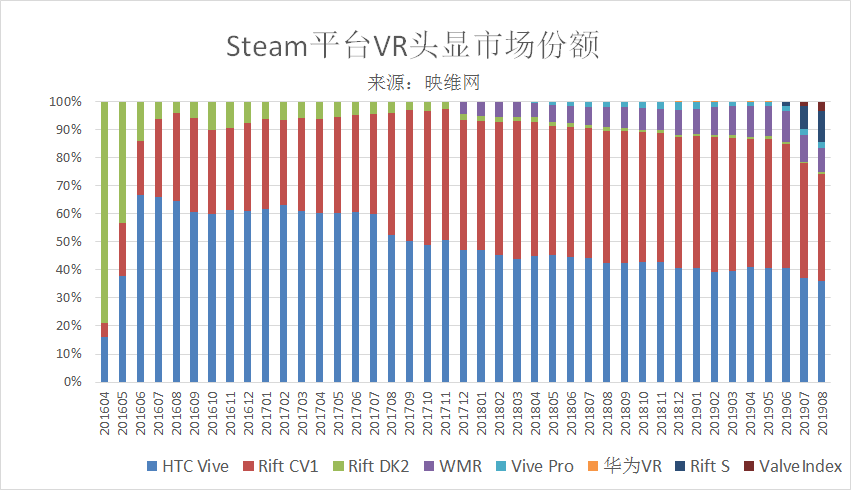
Valve has released its "Steam Hardware and Software Survey" data for August 2019. According to the data, the Oculus Rift S and Valve Index continue to grow in market share, while the Oculus Rift, HTC Vive, and Windows MR are declining. The market share of the Oculus Rift S headset has surpassed the Windows MR headset in just three months, reaching 10.85%. The Windows MR series, which was released in October 2017, took 16 months to reach a market share of over 10%. The market share of the Oculus Rift and HTC Vive decreased by 3.14% and 1.68% respectively compared to the previous month.
In addition, the market share of the Valve Index increased from 1.46% to 3.32%, while the Oculus Rift DK2 increased from 0.56% to 0.64%. Huawei VR increased from 0.01% to 0.02%, Vive Pro increased from 2.19% to 2.2%, and Windows MR decreased from 9.39% to 8.24%.
It's worth noting that the cumulative market share of the data for August 2019 is only 98.43%, with 1.57% of the share being classified as unknown. This discrepancy raises doubts about the accuracy of the data.