
由 L0Lock 制作、可通过快捷键更改 Gizmo 大小的 Blender 插件「GizmoSize」!算是那种先装上再说的插件之一。开源且免费。
Gizmo,也就是在 Maya 里说的操纵器。对于 Maya 用户来说,可能会觉得,咦?Blender 不能调整 Gizmo 的大小吗?,不过,其实在首选项里是有这个设置的。

这个插件可以让你从任意喜欢的快捷键来修改这个 Gizmo 大小的数值。
GizmoSize

添加插件后,也可以从键位映射和视图菜单中访问。
(我分配到了 Shift Ctrl Alt +↑↓)

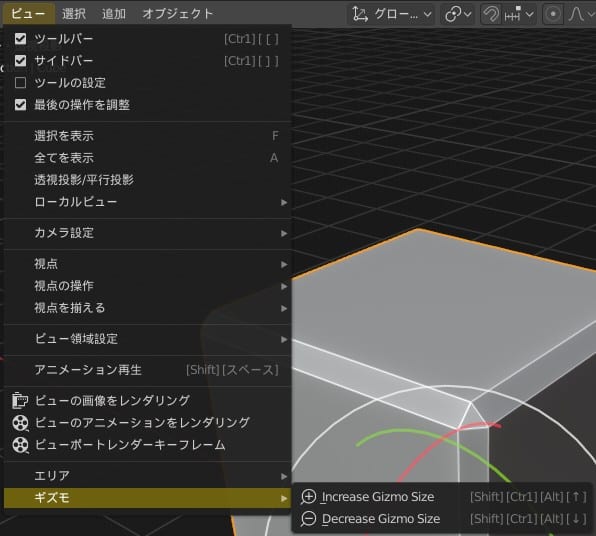
可以在插件首选项中更改按键时的增量值。

我觉得总比没有要好很多,大家可以试试看。
链接
- L0Lock/GizmoSize: Allows you to increase or decrease the Gizmo size from the viewport using keyboard shortcuts and more. | Github
- Gizmo Size: resize your gizmo with ease! – Coding / Released Scripts and Themes – Blender Artists Community
- ArtStation – Gizmo Size Blender Addon